Citation Generator: How It Works and What It Misses
A citation generator is a tool that takes the details of a source, such as its title, authors, publication year, publisher, and identifier, and arranges those details into a reference formatted for a specific style like APA, MLA, or Chicago. You supply a URL, DOI, ISBN, PMID, or title; the tool retrieves or accepts the metadata, maps each field to the right slot in the style template, and returns a string you can paste into your document. That is the whole mechanism. Everything else people believe about these tools, including the idea that they verify accuracy, is an assumption the software does not actually support.
This guide is written for students finishing coursework, graduate researchers assembling a thesis bibliography, and anyone building a reference list large enough that manual formatting has become the slowest part of the writing. It covers how automated referencing works under the hood, what the tools get right, where they fail in predictable ways, how to check a reference in under thirty seconds, and when a free browser tool stops being enough. You will also find a comparison of how the main reference systems differ in what they foreground, and a step-by-step method for citing a single awkward source that no tool handles cleanly.
The practical point worth holding on to is that a citation generator is a formatting engine, not a fact checker. It cannot tell you whether the author list it imported is complete, whether the page you saved is the version of record or a repository copy, or whether the item you labeled a journal article is really a conference paper. Those judgments stay with you. What the tool buys you is time: the minutes you would otherwise spend remembering whether the volume number is italicized, where the period goes after a DOI, and how a three-author source collapses to et al. on second mention. Spend the time you save on the checks the software cannot run.
Key takeaways
- A citation generator converts source metadata into a formatted reference, so its output is only as accurate as the record it pulls from a catalog, a DOI registry, or a web page.
- Automated tools handle punctuation, italics, and element order well; they routinely miss author name order, corporate authors, edition numbers, and the difference between a journal article and a preprint.
- Style choice drives everything else: APA emphasizes publication year, MLA emphasizes page location, and Chicago offers both a notes system and an author-date system.
- Check three fields on every generated reference before you submit: author form, publication year, and the source type the tool assigned.
- For a one-page assignment a free web tool is usually enough; for a thesis or a review with hundreds of sources, a reference manager with a shared library saves far more time than it costs.
What Is a Citation Generator?
A citation generator is a metadata formatter. It holds a set of style templates, each describing which elements a reference contains, in what order, with what punctuation and typography. When you hand it an identifier, it looks up a structured record, matches the record's fields to the template, and prints the result. The same underlying record can therefore produce an APA entry, an MLA entry, and a Chicago note without any new research on your part.
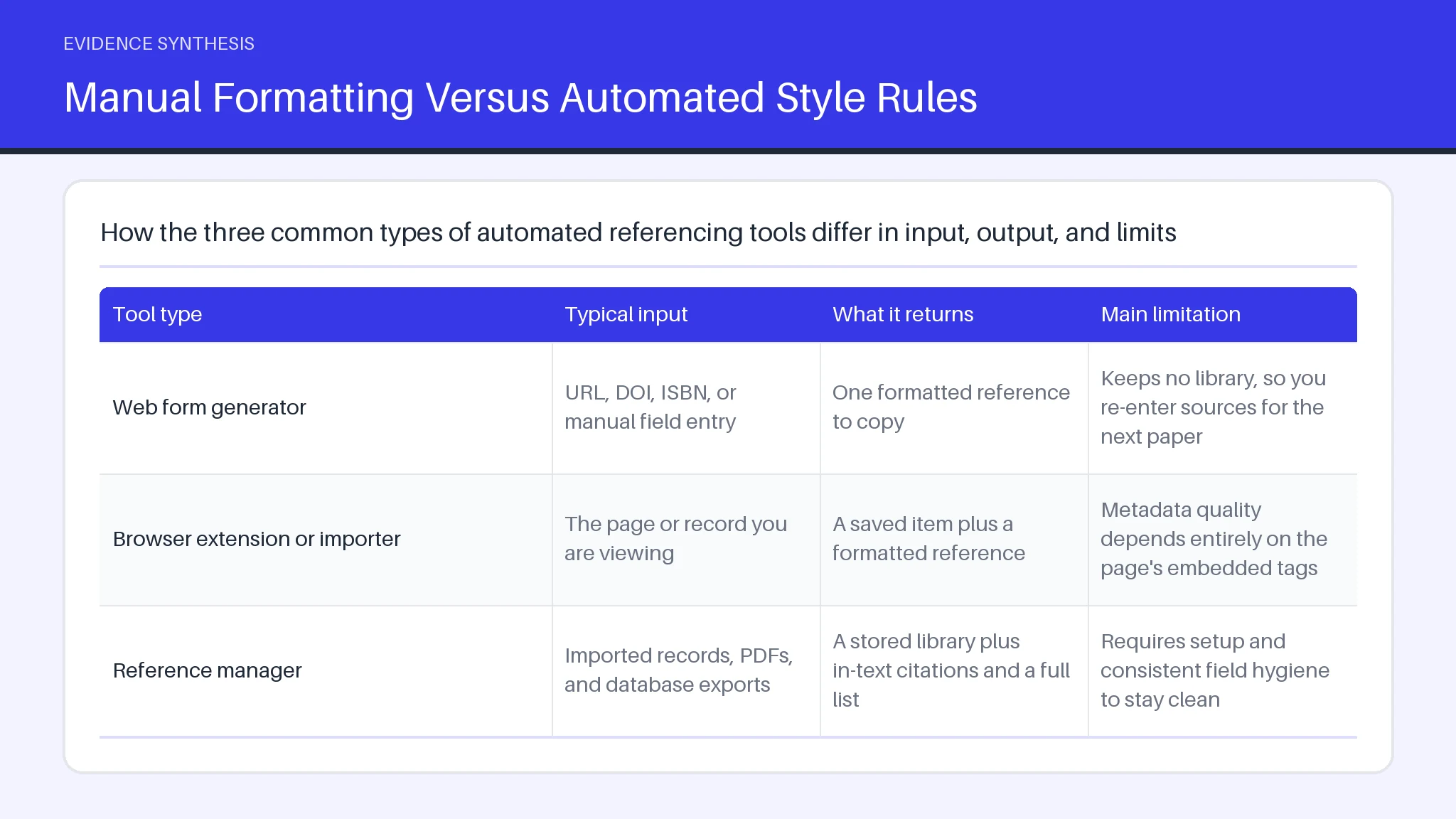
Tools differ mainly in where the metadata comes from and how much of your library they keep.
| Tool type | Typical input | What it returns | Main limitation |
|---|---|---|---|
| Web form generator | URL, DOI, ISBN, or manual field entry | One formatted reference to copy | Keeps no library, so you re-enter sources for the next paper |
| Browser extension or importer | The page or record you are viewing | A saved item plus a formatted reference | Metadata quality depends entirely on the page's embedded tags |
| Reference manager | Imported records, PDFs, and database exports | A stored library plus in-text citations and a full list | Requires setup and consistent field hygiene to stay clean |
None of these categories checks whether the source is appropriate, current, or real. The distinction that matters when you choose one is not output quality, since all three apply the same published style rules, but whether you need the reference once or need the same record again in six months.
Finishing Short Assignments Faster With Automated Referencing
Short assignments reward automation more than long ones, because the formatting overhead per source stays constant while the writing time shrinks. A five-source response paper might take ninety minutes to write and twenty minutes to format by hand. A citation generator collapses that twenty minutes to about four, including the time to check each entry.
The gain is largest for sources with clean identifiers. A journal article with a DOI, a book with an ISBN, and a government report with a stable landing page all resolve quickly and accurately. The gain shrinks for sources with no identifier at all: a lecture slide deck, a podcast episode, an internal dataset, or an organizational web page with no visible author. For those, you will spend as long correcting the imported fields as you would have spent typing the reference from the style manual.
A practical workflow for short work is to batch the citing rather than interleave it. Write the draft with placeholder markers such as author and year in parentheses, then resolve every placeholder in one sitting at the end. Batching keeps you in one mental mode, exposes duplicate sources you cited twice under different titles, and makes it obvious when a claim in your draft has no source attached to it at all.
Citing Books, Websites and Journal Articles in One Place
Books, websites, and journal articles need different reference elements, and the main value of a single citation generator is that it keeps those differences straight so you do not have to. A book reference leads with author, year, title, edition, and publisher. A journal article adds journal name, volume, issue, page range, and a DOI. A web page needs a site name, a publication or update date, and a retrieval path, with an access date only when the content is likely to change.
Problems appear at the boundaries between types. A book chapter in an edited collection needs both the chapter authors and the volume editors, and many tools import only one set. A journal article posted on a university repository often resolves to the repository record rather than the published version, which gives you the wrong year and no volume number. A news article behind a paywall may return the paywall page's title instead of the headline.
The fix is to decide the source type yourself before you paste anything in. Ask what the item actually is, not what site you found it on, then select that type in the tool. If the generated reference names a platform where you expected a publisher, the tool guessed the type wrong and the rest of the fields are likely wrong too.
How Automated Reference Creation Actually Works
Automated reference creation runs in three stages: retrieval, mapping, and rendering. Retrieval pulls a structured record from a source such as a DOI registry, a library catalog, a publisher API, or the metadata tags embedded in a web page. Mapping assigns each retrieved value to a named field, so a string becomes the container title rather than the item title. Rendering applies a machine-readable style definition that specifies order, punctuation, capitalization, italics, and how author names shorten on repeat mentions.
Nearly every modern citation generator uses the same open style definitions, which is why an ACM citation generator, a library's tool, and a desktop reference manager usually produce identical output for the same clean record. Differences in output almost always trace back to differences in the retrieved metadata, not to differences in the formatting rules.
Two failure points follow from this design. First, retrieval can succeed while returning a thin record: a DOI resolves, but the registry holds only the first author and no page range. The tool renders what it has and gives no warning about what is missing. Second, mapping can misclassify. Preprints, conference proceedings, and dissertations are frequently mapped as generic documents or as journal articles, which produces a reference that looks correct and sends your reader to the wrong place. Neither failure triggers an error message, so neither is visible unless you read the output against the source.
Manual Formatting Versus Automated Style Rules
Manual formatting and automated style rules fail in opposite directions, and knowing which failure you are exposed to tells you where to spend your checking time. Manual formatting fails at consistency. Across forty hand-typed references, you will mix sentence case and title case, drop an issue number, use a hyphen where the style wants an en-range, and shorten one author list at three names and another at four. Automated formatting fails at accuracy of content. It applies punctuation flawlessly to fields that may be wrong.
This matters when you work in a style that your tool supports unevenly. Someone using an ASME citation generator for an engineering report, for example, is relying on a numbered reference system whose element order differs from the author-date systems most tools are tuned for, and small mismatches in how paper numbers or conference locations are handled can pass unnoticed.
The practical compromise most experienced writers reach is automation for structure and a manual pass for substance. Let the tool decide where the periods go. You decide whether the author names, the year, the title wording, and the source type are correct. That division takes about twenty seconds per reference and catches the errors that cost marks.
Comparing Free and Paid Citation Tools: What Differs
Free Versus Paid Reference Tools: What Changes
Free tools and paid tools apply the same published style rules, so the trade-off is never about formatting quality. It is about persistence, collaboration, and control of your data. A free web form gives you a reference and then forgets you. A paid or institutionally licensed manager keeps a library you can search, deduplicate, annotate, tag, and sync across devices, and it inserts in-text citations that renumber themselves when you move a paragraph.
That difference is irrelevant for a single essay and decisive for a thesis. Once a project passes roughly fifty sources, or once two people are citing into the same document, manual copy-paste starts producing mismatches between the in-text mentions and the final list. A stored library removes that class of error entirely.
Three other factors deserve weight before you pay. Check whether the tool exports your library in an open format such as BibTeX or RIS, because a library you cannot export is a library you will retype later. Check whether ads or sign-up walls interrupt the workflow, which is the usual cost of a free service. And check style coverage for the specific system you need, since niche engineering and society styles are supported inconsistently; an ASME citation generator built into a general tool may lag the current edition of the manual.
How to Cite a Single Source Step by Step
Citing a source means identifying what kind of item it is, collecting the elements that item type requires, and arranging those elements in the order your style specifies. The process is the same whether you do it by hand or automate it.
- Classify the source. Decide whether it is a book, a chapter, a journal article, a report, a web page, a dataset, a thesis, or a conference paper. This single decision determines every field that follows.
- Find the stable identifier. Look for a DOI on the article's first page or landing page, an ISBN on the copyright page, or a permanent URL. Prefer the identifier over a search-result link, which often expires.
- Collect the core elements. Author or authors in the order printed on the source, publication year, full title with its original capitalization recorded, container such as the journal or book title, and location details such as volume, issue, pages, or publisher.
- Generate or format. Paste the identifier into your tool and select the style, or build the reference from the style manual's pattern.
- Verify against the source. Compare author spelling, year, and title word for word with the item in front of you.
- Add the in-text citation. Match the first element of the reference, usually the author surname, so the reader can find the full entry.
Discipline-specific habits matter at step one. Researchers reaching for an ecology citation generator often cite datasets, species databases, and agency technical reports rather than journal articles, and those item types carry version numbers and access dates that article templates simply do not have fields for. Add them manually.
APA, MLA and Chicago: The Styles Students Need Most
APA, MLA, and Chicago differ because they were designed for disciplines that value different information. APA, used across psychology, education, nursing, and the social sciences, puts the publication year immediately after the author because recency carries evidential weight. MLA, used in literature and the humanities, puts page locations forward because the argument turns on specific passages in a stable text. Chicago offers two systems: notes and bibliography, favored in history, and author-date, which resembles APA and is common in the sciences.
The visible consequences are small but graded. APA uses sentence case for article and book titles and an ampersand before the final author. MLA uses title case and spells out "and." Chicago notes invert only the first author's name in the bibliography and place full publication details in the footnote on first mention.
In-text behavior differs more than the reference list does. APA gives author and year, MLA gives author and page, and Chicago notes give a superscript number. A tool set to the wrong style will still produce clean, confident output, which is why checking the style selector before you generate a single reference saves more rework than any later fix. The same caution applies to discipline-specific tools; an ecology citation generator defaulting to a journal house style will not match an APA assignment brief.
Building a Bibliography or Works Cited Page Automatically
A works cited list or bibliography is formatted by placing every entry in a single alphabetical sequence by the first element of each reference, usually the author surname, with a hanging indent of half an inch and consistent spacing throughout. APA calls the page References, MLA calls it Works Cited, and Chicago calls it Bibliography, but the mechanics are the same: one list, alphabetized, no numbering unless your style uses a numbered system, and no separate sections for books and websites unless an instructor asks for them.
Automation handles the alphabetizing and the indentation reliably. It handles three things poorly. Sources with no author should alphabetize by title, and tools sometimes park them under "Anonymous" or at the end. Multiple works by the same author need a consistent ordering rule, by year in APA and by title in MLA, which imported records can scramble. And duplicate entries created when the same article was imported once from a database and once from a publisher page will sit next to each other looking almost identical.
Run three checks on the finished list. Confirm every in-text citation has a matching entry and every entry has at least one in-text mention. Scan the first word of each line to confirm true alphabetical order. Look for repeated titles that signal duplicates. Numbered systems need a fourth check, since a tool configured as an ACM citation generator orders entries by first appearance rather than alphabetically, and moving a paragraph after generating the list can break that sequence unless the field is refreshed.
Frequently asked questions
What Are Citation Styles?
Citation styles are published rule sets that specify which elements a reference contains, in what order, and with what punctuation and typography. Each major style belongs to a scholarly community: APA to psychology and the social sciences, MLA to literature and the humanities, Chicago to history and publishing, Vancouver to biomedicine, and IEEE to engineering and computing. The differences are conventions, not quality rankings. What matters is applying one style consistently across every reference and every in-text mention in a single document.
Why citing matters: credit, verification, and a clear line between your contribution and someone else's.
Why Do I Need To Cite?
You need to cite because attribution credits prior work and lets a reader locate your evidence. Institutions treat missing attribution as misconduct, but the practical reason is simpler: an uncited claim cannot be verified. Automated tools help with form, not with whether the source supports your claim.
These tools format references by matching a structured metadata record against a machine-readable style definition. The definition lists the elements in order and specifies the punctuation between them, the capitalization of each, which parts are italicized, and the rules for shortening author lists. Because most tools use the same shared style definitions, output differences between tools almost always come from the metadata, not the formatting logic.
What should you know about how citation generators format references?
Automated tools do not check whether the source exists, whether it is peer reviewed, whether it has been retracted, whether the author list is complete, whether the version you found is the version of record, or whether the source supports the claim you attached it to. They also do not detect that you selected the wrong item type. Every one of those checks is a human judgment, and every one of them is the kind of error that a grader or a peer reviewer notices.
What citation generators do not check?
A citation generator works by resolving an identifier such as a DOI, ISBN, PMID, or URL into a structured record, mapping each value in that record to a named reference field, and rendering the fields through the style template you selected. When no identifier is available, the tool falls back on whatever metadata is embedded in the page, which is often thin or wrong. Manual entry forms exist precisely because that fallback fails so often.
How Do Citation Generators Work?
Citation generators work by retrieving a metadata record, mapping its values to named reference fields, and rendering them through a style template. Citation errors are so common in academic writing because that metadata supply chain has weak links and no error signal: publishers tag pages inconsistently, repositories hold duplicates, and aggregators truncate author lists, while the output still looks authoritative.
How to Check a Generated Citation Before Submission?
Check a generated reference by comparing four things against the source itself: the author names and their order, the publication year, the title as printed, and the item type the tool assigned. Then confirm the identifier resolves by clicking the DOI or URL. This takes roughly twenty to thirty seconds per reference and catches the large majority of real errors. For a long reference list, run the check as a single pass at the end rather than source by source, which is faster and makes duplicates and inconsistencies easier to spot.
How Do Citations Actually Work?
Citations work as a two-part system. A brief in-text marker, such as an author and year, an author and page, or a superscript number, sits at the point of the claim. A full entry in the reference list carries the complete details needed to locate the source. The marker and the entry must match on their first element, because that is the only link between them. When a marker has no matching entry, or an entry has no marker, the system breaks and the reader cannot follow the evidence trail. If your work is heading toward a formal evidence synthesis, the same discipline carries into structured reporting standards such as those covered in the PRISMA 2020 guide, where every included record has to be traceable.