Canvas AI Detector: What It Really Checks
Canvas itself does not ship an AI writing checker. When people search for a Canvas AI detector, they are usually describing something different: a third-party similarity and AI writing service that an institution licenses separately and connects to Canvas, so its results appear inside the grading interface alongside the submission. Canvas is the delivery layer. The detection work happens elsewhere, and whether it happens at all depends on decisions made by an administrator and then by the instructor who sets up the individual assignment.
That distinction matters for both sides of the gradebook. Students assume the learning management system is quietly scanning everything they upload. Instructors often assume a Canvas AI detector is switched on by default and is more definitive than it is. Neither assumption holds up.
This article explains what Canvas can and cannot observe, how connected similarity tools produce an AI writing score, what that score actually means statistically, how false positives arise, and what practical assessment design does better than any probability number. It is written for instructors, program leads, academic integrity officers, and students who want an accurate picture rather than a rumor.
Key takeaways
- Canvas has no native AI writing checker of its own. Any Canvas AI detector an instructor sees is a licensed third-party similarity service connected through the LTI standard and surfaced inside SpeedGrader.
- AI writing scores and similarity percentages measure different things. A similarity score points to matched text in an index; an AI writing score is a statistical prediction about how the sentences were produced.
- Standard Canvas quizzes record timing, attempt logs, and page leave events, but they do not read a student's other browser tabs or identify text generated in an external chat window.
- False positives are the main practical risk. Short submissions, translated writing, heavily edited drafts, and formulaic technical prose are the categories most often misread, so a score should trigger a conversation rather than a penalty.
- The durable fix is assessment design: staged drafts, version history, in-class components, and source-specific prompts give instructors evidence that no probability score can supply.
Can Canvas Detect ChatGPT, AI Text, or Copied Work?
Canvas can detect copied work only when a similarity service is attached to the assignment, and it cannot independently identify text from ChatGPT at all. On its own, the platform stores files, timestamps, and submission metadata. It does not compare your prose against a plagiarism index and it does not run a classifier. A Canvas AI detector is therefore a licensed integration such as a Turnitin connection, chosen per assignment as the review provider, with results written back into the grading view.
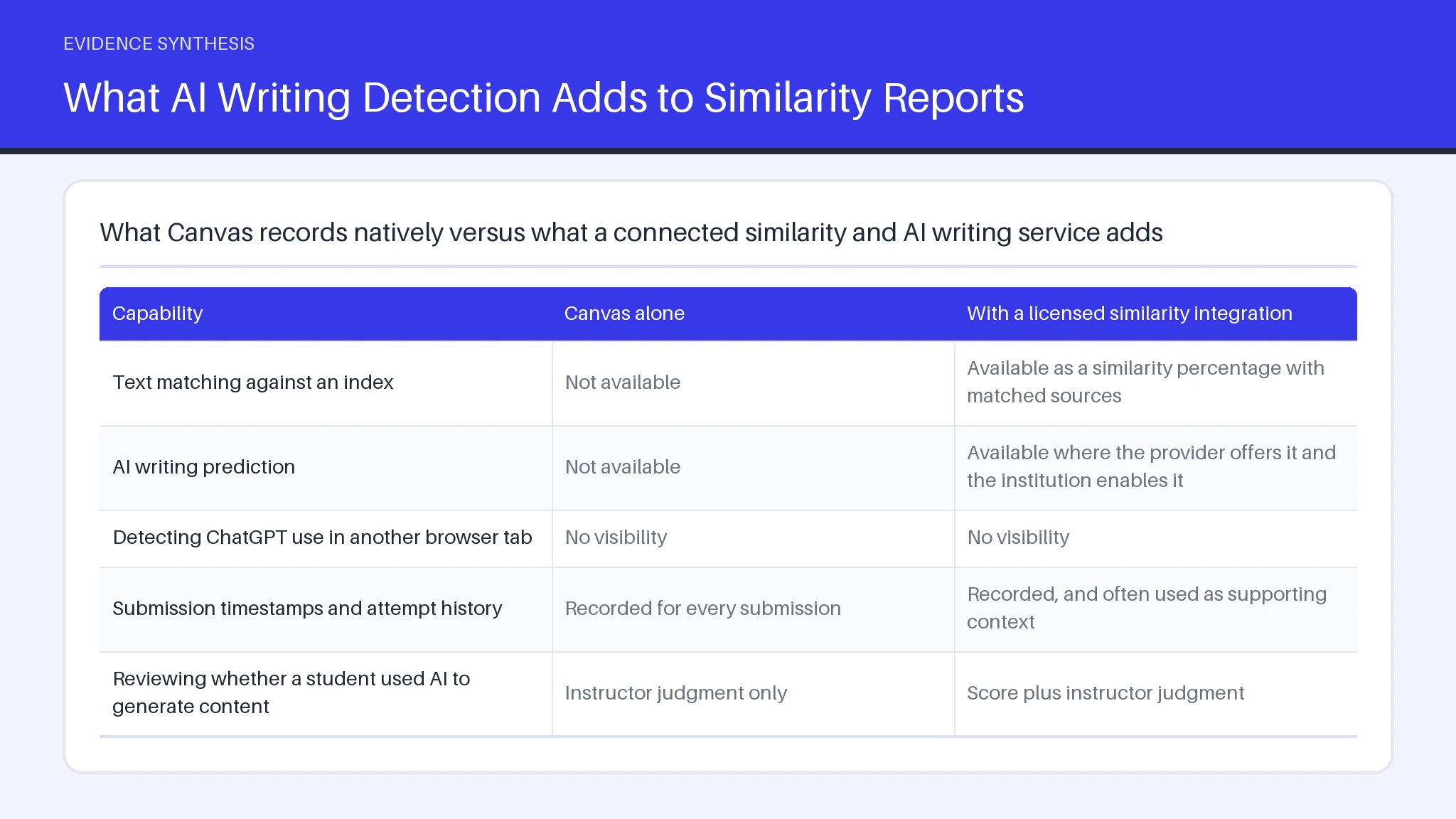
The table below separates what the core platform records from what a connected service adds.
| Capability | Canvas alone | With a licensed similarity integration |
|---|---|---|
| Text matching against an index | Not available | Available as a similarity percentage with matched sources |
| AI writing prediction | Not available | Available where the provider offers it and the institution enables it |
| Detecting ChatGPT use in another browser tab | No visibility | No visibility |
| Submission timestamps and attempt history | Recorded for every submission | Recorded, and often used as supporting context |
| Reviewing whether a student used AI to generate content | Instructor judgment only | Score plus instructor judgment |
Suggested visual: a two-column capability diagram contrasting the native platform with an attached provider, labeled only with the rows above.
Does Canvas Have Built In AI Detection?
Canvas has no built in AI detection feature. The platform ships assignment settings, rubrics, quizzes, and a grading interface, and none of those components include a classifier. Every instance of AI detection inside Canvas arrives through an external provider that the institution has licensed and an administrator has switched on at the account or sub-account level.
That architecture has a practical consequence. Two courses at the same university can behave completely differently: one assignment routes submissions to a provider and shows an AI detection result, while the next assignment in the same course shows nothing because the instructor never selected a review provider when building it. There is no global switch that makes a Canvas AI detector apply retroactively to past work.
It also means the accuracy question is not really about Canvas. When people ask how reliable AI detection is, they are asking about the provider's classifier and the evidence published about it. Canvas only decides where that number appears on screen.
How Integrated Similarity Tools Catch AI Written Submissions
Integrated similarity services work by intercepting the file at submission. Because Canvas is built on the LTI 1.3 interoperability standard, an institution can integrate a provider once and then instructors integrate it per assignment by naming it as the review provider. The submission travels to the provider, which runs text matching and, separately, a classifier that estimates whether the sentences were likely AI generated. Both results return to the grading view.
The matching half is mechanical: it finds overlapping strings against indexed web pages, publications, and prior student work, which is why a copy and paste passage surfaces quickly. The classifier half is probabilistic. It scores sentence-level predictability rather than looking anything up, so AI generate content that no human ever published can still be flagged.
Any detection tool like Turnitin only sees what passes through the integration. Work drafted elsewhere and typed in fresh still reaches the classifier, but a tool like Turnitin cannot show how the words were produced, only how closely the finished AI write pattern resembles machine output.
Why More Students Are Using AI to Write Coursework
Students turn to AI writing tools mainly because of workload compression and low friction. Multiple deadlines land in the same week, a chat window is free and instant, and the output looks like a finished assignment. Surveys of student behavior consistently point to time pressure and confidence gaps in writing rather than a deliberate plan to cheat.
Use also spans a wide range. Some students ask a model to explain a concept or tighten a paragraph. Others generate an outline. Others copy and paste an entire response. Only the last category is unambiguous misconduct, yet a single Canvas AI detector score cannot distinguish the three, and the AI use detector behavior of one provider will not match another.
That ambiguity is the real policy problem. Treating every flag as plagiarism erodes trust, and a Turnitin style detection tool was never designed to measure intent. Where students know which uses are permitted for each assignment, AI generated drafting tends to move into the open, and AI generate content becomes something they disclose rather than hide. Clear method documentation, the same habit that underpins a defensible systematic review, helps here.
What AI Writing Detection Adds to Similarity Reports
AI writing detection adds a second, independent signal to a report that previously measured only textual overlap. A similarity score answers a lookup question: does this passage appear somewhere in an index? AI writing detection answers a statistical question: how predictable is this sequence of words compared with human prose? A submission can score near zero for matched text and still return a high AI writing figure, which is exactly the gap that detection layer was built to cover.
What the number does not add is proof. An AI detection tool reports a probability across a stretch of text, usually with a minimum word count before it will score anything. Short reflections, lab write-ups, and formulaic method sections sit close to the boundary where any AI use detector becomes unreliable.
Read together, the two figures help an instructor decide what to ask about an assignment. They do not detect intent, they do not detect editing history, and no responsible integrity process treats a detection percentage as a finding of plagiarism on its own.
Can Canvas Quizzes Detect AI Use During a Test?
Canvas quizzes cannot detect AI use inside another application. A standard quiz logs when a student opened the attempt, how long each page took, and in some configurations whether the browser window lost focus. None of that can detect AI text being produced in a separate chat window, and none of it reads the clipboard or other tabs. Institutions that want stronger conditions add a lockdown browser or proctoring layer, which is a separate integration with its own privacy review.
A Turnitin connection does not change this either. That provider evaluates submitted text, so it can detect AI patterns in an essay-style assignment but has nothing to work with on a multiple-choice attempt. The same limit applies to any llm-based classifier: no model can detect AI use it never sees.
Timing data is the practical signal instructors actually use. An unusually fast attempt with long, polished free-text answers invites a follow-up question, though the percentage of legitimate fast finishers is high enough that timing alone proves nothing. Whichever provider answers the question of which AI detector does Canvas use at a given institution, quiz attempts stay largely outside its reach, and students who generate answers offline remain hard to detect AI activity for by log data alone.
Manual Checks Instructors Use When No Detector Is Enabled
Manual review remains the most common approach, because most courses never enable a provider at all. Experienced instructors start with internal consistency: does the vocabulary match the student's earlier work, do the citations exist, and do the quoted sources say what the paragraph claims? Fabricated or subtly wrong references are still the clearest signal of AI generated drafting, and they cost nothing to detect.
Second, instructors check document history. Cloud documents keep revision timelines, so a file written in one long unbroken block reads differently from one revised across a week. Third, they ask process questions in office hours, which no AI detection tool can substitute for.
When an institution asks which AI detector does Canvas use, the honest answer is that it uses whichever service has been licensed and enabled, whether that is a Turnitin AI writing feature, a Copyleaks-style checker, or nothing. Until an administrator chooses to enable one, and the instructor chooses to enable it on the assignment, instructor judgment carries the whole load, and instructor documentation of that judgment is what survives an appeal. Instructors who set expectations in the syllabus need to detect far less after the fact.
How Suspected Copying and AI Cheating Get Flagged
A flag is an administrative process, not an automatic verdict. It typically begins when an instructor sees a high similarity percentage, an AI write score, or an inconsistency in the assignment, then documents the specific passages rather than the headline number. Most institutional policies then require a meeting with the student before any allegation is recorded.
The evidence that holds up is concrete: matched sources from the scan, missing or invented citations, a revision history that shows a single paste event, and the student's own account of their process. A Turnitin report or a Copyleaks-style result functions as a starting point in that file. Reviewers weigh it against the fact that no classifier, including an llm-based one, can confirm which AI tool produced a passage or whether a human paraphrased AI generated text afterward.
Outcomes vary by policy and by the student's record. Undisclosed use of an AI write assistant is often treated under a separate clause from classic plagiarism, since the text was newly generated rather than copied, and penalties differ accordingly.
Enabling and Configuring a Canvas AI Detector Setting
Configuration happens at two levels, and both must be complete before any score appears. An administrator first licenses a provider and activates the integration for the account, accepting the data-processing terms that send student work to an external service. The instructor then opens the assignment settings and selects that provider as the plagiarism review option, sets whether students can see their own report, and decides whether resubmissions are re-scanned.
Before you start, you need three things: an active institutional license, administrator rights or an admin who will act, and a written statement in the syllabus explaining what is checked and why. Skipping the third item is the most common mistake, because a scan students did not expect creates an integrity dispute of its own.
Two configuration choices matter most. Turning on student-visible reports lets writers fix an unintentional copy and paste citation error before the deadline. Setting a review threshold prevents staff from chasing every low score. A Turnitin-style provider will still flag properly quoted material and AI generated phrasing that a human wrote, so a human must detect the difference, detect the context, and detect whether the flag is meaningful at all.
Frequently asked questions
Can Canvas actually detect AI?
Canvas cannot detect AI by itself. The platform provides no classifier and no text-matching index, so any AI result an instructor sees comes from a licensed third-party service connected through the LTI standard. Where no service is connected, the only checks available are the instructor's own reading of the work.
Does Canvas use a Turnitin AI Detector?
Some institutions do license a Turnitin connection that includes an AI writing indicator, and in those courses the score appears inside the Canvas grading view. It is an institutional purchase rather than a Canvas feature, so availability differs between universities and even between departments in the same university.
Can ChatGPT be detected in Canvas?
ChatGPT output can be flagged, but flagged is not the same as identified. A classifier estimates how predictable the text is; it cannot name the model that wrote it. False positives concentrate in short submissions, writing by multilingual authors, and formulaic technical prose, which is why a score should open a conversation about process rather than close a case.
Is Canvas like Turnitin?
Canvas is not comparable to a similarity service. Canvas delivers and grades coursework, while a similarity service compares text against an index and returns a report. One is a learning management system; the other is a checking service that can plug into it.
Is 25% on Turnitin too high?
A 25% similarity score is not automatically a problem. Long reference lists, quoted instruments, and shared assignment templates routinely push the figure up, so the sensible step is to open the report and look at what matched. A 5% score made of one unattributed paragraph is more serious than 25% spread across correctly cited quotations.
Can Turnitin really detect ChatGPT?
Turnitin's classifier can flag text consistent with ChatGPT, and the vendor publishes its own accuracy claims, which institutions should evaluate independently rather than accept at face value. When choosing any provider, look for published false-positive rates, sentence-level rather than document-level output, a documented appeals path, transparent data retention, and evidence from independent testing.
Is it possible to get 0% AI on Turnitin?
Zero AI scores are entirely possible and common for ordinary human writing, since the classifier reports what the prose resembles rather than what a student did. That cuts both ways: heavily edited AI text can also score near zero, which is the clearest argument for assessment design over detection. Staged drafts, in-class components, and transparent method reporting, the same principles behind PRISMA reporting standards, give stronger evidence than any detection percentage. Systematicly applies that same documentation-first approach to evidence synthesis work.