A PRISMA flowchart is the figure in a systematic review that tracks every record from the first database search to the final set of included studies. A credible one depends on three decisions: which template you use, which paper you cite, and whether a PRISMA extension changes what the diagram has to show. This article walks through those decisions. It is written for graduate students, clinicians, librarians and research teams preparing a review for a journal or a thesis committee.
This article does not cover how to fill in each box. Our sibling article PRISMA Flow Diagram: Build Yours Box by Box does that in detail. Our PRISMA reporting guide explains the full reporting standard and its checklist. If you are newer to the method as a whole, the complete guide to systematic reviews sets out each phase before you reach reporting. Here we focus on the choices around the diagram. They are easy to get wrong because the templates themselves do not explain them.
These choices matter because a reviewer can check the flow diagram at a glance. Suppose a diagram uses the 2009 layout, cites the wrong statement, or leaves out boxes that an extension requires. That suggests the rest of the reporting may be out of date too. You can fix these problems in minutes before you submit. During revision, the same fix can mean pulling counts out of screening logs you closed months ago.
Gather these materials before you start:
- A complete screening log. It should give counts for each stage: records from each database and register, duplicates removed, records excluded at title and abstract, reports sought, reports not retrieved, reports assessed at full text, and full-text exclusions grouped by reason. Our guide on how to screen studies explains how to keep this log during screening.
- A list of every source and its search date. Include websites, organizations and citation searching as well as bibliographic databases, because PRISMA 2020 reports these in their own column.
- Your protocol or registration record. Use it to confirm that the review type and planned methods match what you report. If you have not registered yet, see our page on writing and registering a systematic review protocol.
- Counts from the previous version, for an update. Updated-review templates ask for the studies and reports included last time.
- Your target journal's author instructions. Many journals ask for a completed checklist with page or line numbers as a supplementary file, along with the figure.
Make sure the counts add up before you draw anything. Take the records identified and subtract the records removed before screening. The result should equal the records screened. Then subtract the records excluded at title and abstract from the records screened. That should equal the reports sought for retrieval. Run this check at every stage, whether you keep the log in a spreadsheet or in a review platform such as Systematicly. A careful reader can spot a single mismatch quickly, and it can raise doubts about the whole selection process. Think of the PRISMA flowchart as the visible end of that audit trail, not as a separate design job.
Key takeaways
- If you use the current flow diagram template, cite the PRISMA 2020 statement (Page et al., BMJ 2021;372:n71). Add the explanation and elaboration paper only if you relied on its guidance.
- PRISMA 2020 replaced the four-phase layout from 2009 with three phases: identification, screening and included. Databases and registers now sit in a separate column from other sources.
- There are four official templates. They cover new or updated reviews, each with or without other sources such as citation searching.
- A few extensions, such as PRISMA-IPD, change the diagram itself. Others, such as PRISMA-S, change only what you report about the search.
- The diagram goes in the results section. The methods section describes the search and selection process that produced its numbers.
Which PRISMA Papers to Cite When Using the PRISMA Flowchart
A PRISMA flowchart is the standard flow diagram from the PRISMA reporting guideline. To credit it, you cite the PRISMA statement it comes from, not the template file or the PRISMA website. The 2020 templates make this clear: each one carries a source line that points to the PRISMA 2020 statement by Page and colleagues. That source line is your cue to cite the statement in the reference list.
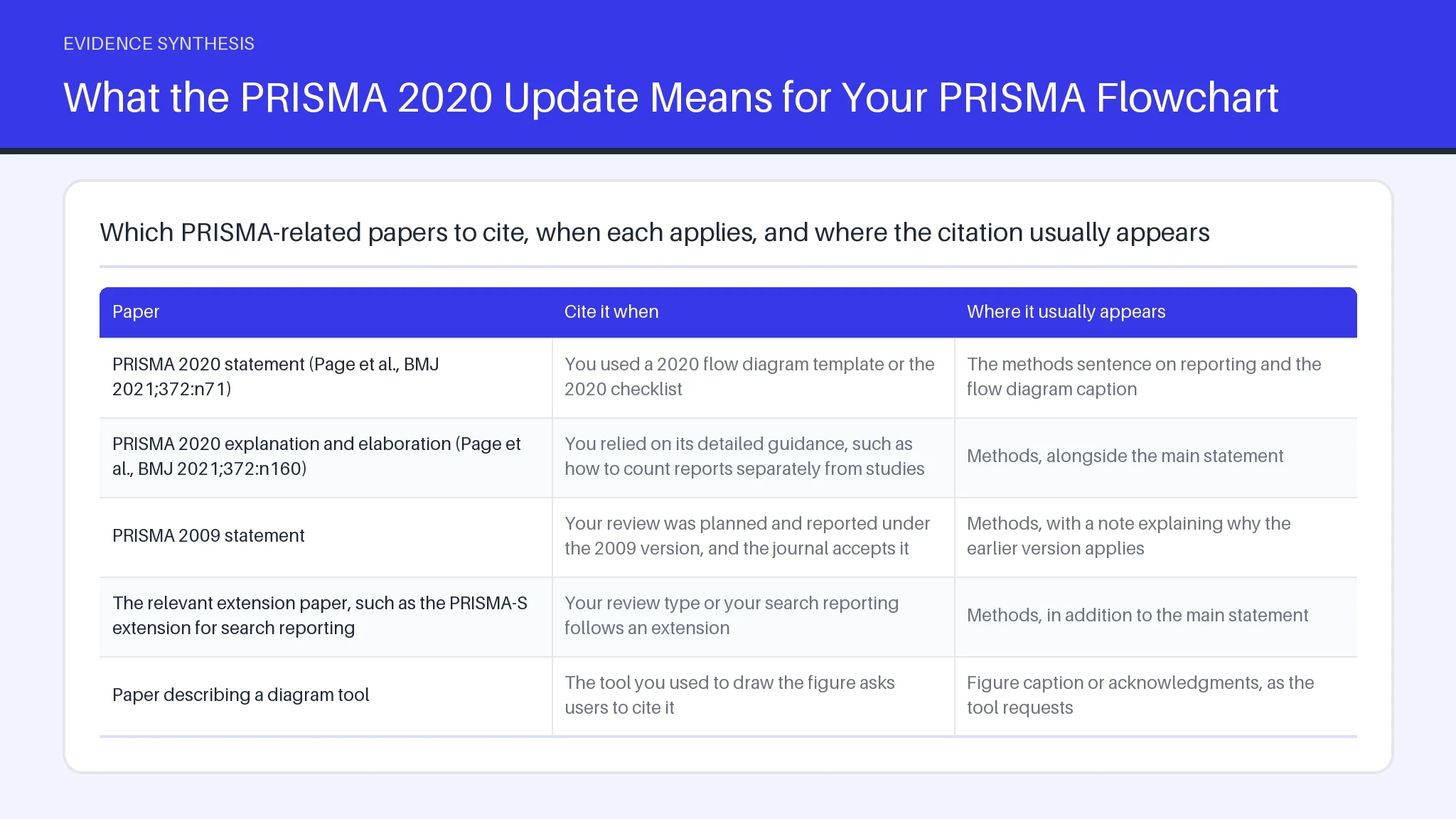
The PRISMA 2020 statement appeared in several journals at the same time, including The BMJ, PLOS Medicine and Systematic Reviews. Cite one version, not all of them. Most authors cite the BMJ version. If your target journal published its own copy, citing that copy is sensible. A typical methods sentence reads: "This review is reported in accordance with the PRISMA 2020 statement," followed by the citation. The figure caption should name the template, for example "PRISMA 2020 flow diagram for new systematic reviews which included searches of databases and registers only," and cite the statement again where the journal's style allows.
| Paper | Cite it when | Where it usually appears |
|---|---|---|
| PRISMA 2020 statement (Page et al., BMJ 2021;372:n71) | You used a 2020 flow diagram template or the 2020 checklist | The methods sentence on reporting and the flow diagram caption |
| PRISMA 2020 explanation and elaboration (Page et al., BMJ 2021;372:n160) | You relied on its detailed guidance, such as how to count reports separately from studies | Methods, alongside the main statement |
| PRISMA 2009 statement | Your review was planned and reported under the 2009 version, and the journal accepts it | Methods, with a note explaining why the earlier version applies |
| The relevant extension paper, such as the PRISMA-S extension for search reporting | Your review type or your search reporting follows an extension | Methods, in addition to the main statement |
| Paper describing a diagram tool | The tool you used to draw the figure asks users to cite it | Figure caption or acknowledgments, as the tool requests |
Some rules of thumb cover most cases. Do not cite the 2009 and 2020 statements together for the same diagram, because readers will not know which template you followed. Cite an extension in addition to the main statement, never instead of it, unless the extension itself says it replaces the parent guideline. A protocol reported under PRISMA-P is one example. Keep the two citations separate in your writing: a reporting statement explains how you wrote the paper, and a methods source, such as the Cochrane Handbook, explains how you did the review.
What the PRISMA 2020 Update Means for Your PRISMA Flowchart
The PRISMA 2020 update changed the flow diagram's structure, its terms and the number of templates. A diagram copied from an older review usually needs rebuilding, not just new labels. Our PRISMA 2020 guide covers the full list of differences between versions. These are the changes that affect the figure directly:
- Three phases instead of four. Identification, screening and included replace the 2009 rows. Full-text eligibility assessment now sits within screening.
- Records, reports and studies are counted separately. A record is a title and abstract. A report is a document such as an article, preprint or trial registry entry. A study can have several reports. The final boxes give both the number of studies and the number of reports.
- Databases and registers are counted apart from other sources. Websites, organizations and citation searching go in a separate column, with their own retrieval and assessment boxes.
- Removals before screening are shown openly. Duplicates, records marked ineligible by automation tools and records removed for other reasons each get their own count.
- Retrieval is a visible step. "Reports sought for retrieval" and "reports not retrieved" show where full texts were lost.
- Updated reviews have their own templates. These templates add boxes for the studies included in the previous version.
Check whether your PRISMA flowchart still has an "Eligibility" row or one box for "records identified through other sources." If it does, it follows the 2009 layout. These are the most common flow-specific mistakes:
- Labeling the final count as "studies" when it actually counts reports.
- Removing records with an automation tool without saying which tool or how it was used.
- Giving exclusion reasons that do not add up to the total number of reports excluded.
- Leaving out reports that were sought but never retrieved.
Which PRISMA Extension Matches Your Review Type?
You use PRISMA for a systematic review in three steps. Identify your review type at the protocol stage. Choose the PRISMA 2020 statement plus any extension that fits. Then report against both checklists as you write, not after the draft is done. Choosing the extension early matters because some extensions ask for data you can only collect during the review. If you only discover a requirement at submission, you may not be able to recover that data.
Only a few extensions change the PRISMA flowchart itself. Most add checklist items to other parts of the manuscript. This is how the main options affect the figure:
- Standard intervention reviews, with or without a meta-analysis: use PRISMA 2020 alone, with the standard templates.
- Network meta-analysis (PRISMA-NMA, 2015): the selection flow stays the same. You report the network's structure in a separate figure.
- Individual participant data reviews (PRISMA-IPD, 2015): the diagram has to show which studies you asked for participant data, which provided it, and which did not. That is an extra layer below the included-studies boxes.
- Diagnostic test accuracy reviews (PRISMA-DTA, 2018): the standard selection flow applies. The extension changes how you report index tests, reference standards and accuracy results.
- Scoping reviews (PRISMA-ScR, 2018): these use a flow diagram to show how sources were selected. Our article on scoping reviews explains when this review type fits.
- Protocols (PRISMA-P, 2015): a protocol has no flow diagram, because no studies have been selected yet. It describes the planned selection process instead.
- Search reporting (PRISMA-S, 2021): this applies alongside any of the options above. It does not add boxes, but it shapes how you describe the sources behind each identification count.
Some reviews involve more than one type, such as an IPD network meta-analysis. In that case, use the parent statement plus every relevant extension, and build the diagram to meet the strictest of them. If you are still choosing software to manage screening and counts, our systematic review tools comparison sets out the trade-offs by category.
Frequently asked questions
What is a PRISMA flowchart?
A PRISMA flowchart is a standard diagram showing how many records a systematic review identified, removed, screened and included, with reasons for excluding full-text reports. Researchers use one because readers can check the selection process at a glance, which makes the review reproducible. It also shows whether losses at any stage could bias the findings. The diagram goes in the results section. Our box-by-box guide explains each count.
The four steps of PRISMA usually means the four phases of the 2009 flow diagram: identification, screening, eligibility and included. PRISMA 2020 cut these to three by moving eligibility assessment into screening. A current diagram therefore shows identification, screening and included. If a recent paper shows four phases, it was built on the older template.
What are the four steps of a PRISMA?
PRISMA stands for Preferred Reporting Items for Systematic reviews and Meta-Analyses. It is a reporting guideline, first published in 2009 and updated in 2020. It tells authors what to report, not how to run a review. Guidance on doing the review comes from methods sources such as the Cochrane Handbook.
What does PRISMA stand for?
You make a PRISMA flow diagram by choosing the right 2020 template, entering counts from your screening log, and checking that each box adds up with the one above it. Work in this order:
How do I make a PRISMA flow chart?
- Choose the template: a new or updated review, with databases and registers only or with other sources as well.
- Enter the identification counts for each source, then the records removed before screening.
- Enter the screening, retrieval and full-text assessment counts.
- List each full-text exclusion reason with its number.
- Report the included studies and their reports as separate figures.
What is the best free program to create a flowchart?
For most reviews, the best free program for a flowchart is the official PRISMA 2020 template in an editable word-processor file, because its boxes and labels are already correct. Free general diagramming apps also work, as do the shape tools in word processors and presentation software. If you use R, Haddaway and colleagues described an open-source PRISMA2020 package and web app in Campbell Systematic Reviews in 2022. Whichever you use, export at the resolution your journal asks for.
What are the 27 items checklist in PRISMA?
The 27-item PRISMA 2020 checklist covers every part of a systematic review report: title, abstract, introduction, methods, results, discussion, and other information such as registration, funding and competing interests. Some items have sub-items. Item 16a asks you to describe the results of the search and selection process, ideally with a flow diagram. That is why the diagram belongs in results, while the methods items cover your search strategy and selection process. Our PRISMA guide goes through every item.
What is the PRISMA tool?
The PRISMA tool is a reporting guideline made up of a checklist and a flow diagram. It is not an instrument for rating study quality or risk of bias. Following PRISMA makes a review transparent, but it does not make the review sound. To judge the studies you include, use a critical appraisal or risk-of-bias tool suited to their designs. Software can help you track counts, but compliance depends on what you actually report.