Literature Review Software: How to Pick the Right Tool
Literature review software helps you find, deduplicate, screen, appraise, organize, and write up a body of published evidence without losing track of what you did. By the end of this article you will know which categories of tool handle which stage of a review, what the free options genuinely cover, where paid platforms earn their keep, and how to assemble a small toolkit that fits the size and formality of your project. It is written for graduate students running a first thesis review, research staff supporting a team project, and anyone who has to show a supervisor or an editor exactly how records moved from a search result list to a final included set.
The distinction that matters most is between tools built for discovery and tools built for decisions. Discovery tools expand a reading list from a seed paper or a natural language question. Decision tools record a judgment: whether a record meets your inclusion criteria, who made that call, and how a disagreement was resolved. Most people searching for literature review software are actually looking for the second kind, because screening is the stage where volume becomes unmanageable and spreadsheets start to break down.
Your method also sets your requirements. A reading-led review built around themes needs flexible note-taking and strong citation handling, and the broader planning and writing sequence for that format sits in our guide to how to plan, judge and write a literature review. A protocol-driven review needs reproducible counts at every step. Work out which you are doing first, then pick software to match, and treat tool choice as a method decision rather than a shopping exercise.
Key takeaways
- Literature review software is not one product category: search and discovery tools, screening platforms, reference managers, coding software, and writing assistants solve different problems, and most review teams end up using three or four of them together.
- Screening is where software saves the most hours, because it is the only stage where two people independently judge thousands of records against the same inclusion criteria.
- Free options cover solo projects well; paid platforms earn their cost mainly through dual-reviewer workflows, conflict tracking, and audit trails that a thesis committee or journal editor can inspect.
- AI-assisted features speed up prioritization and summarizing, but every citation and every quoted claim needs to be checked against the original record before it enters your manuscript.
- Choose tools by review stage and team size, not by feature count, and confirm export formats early so your records move between tools without manual retyping.
Literature Review Software Compared at a Glance
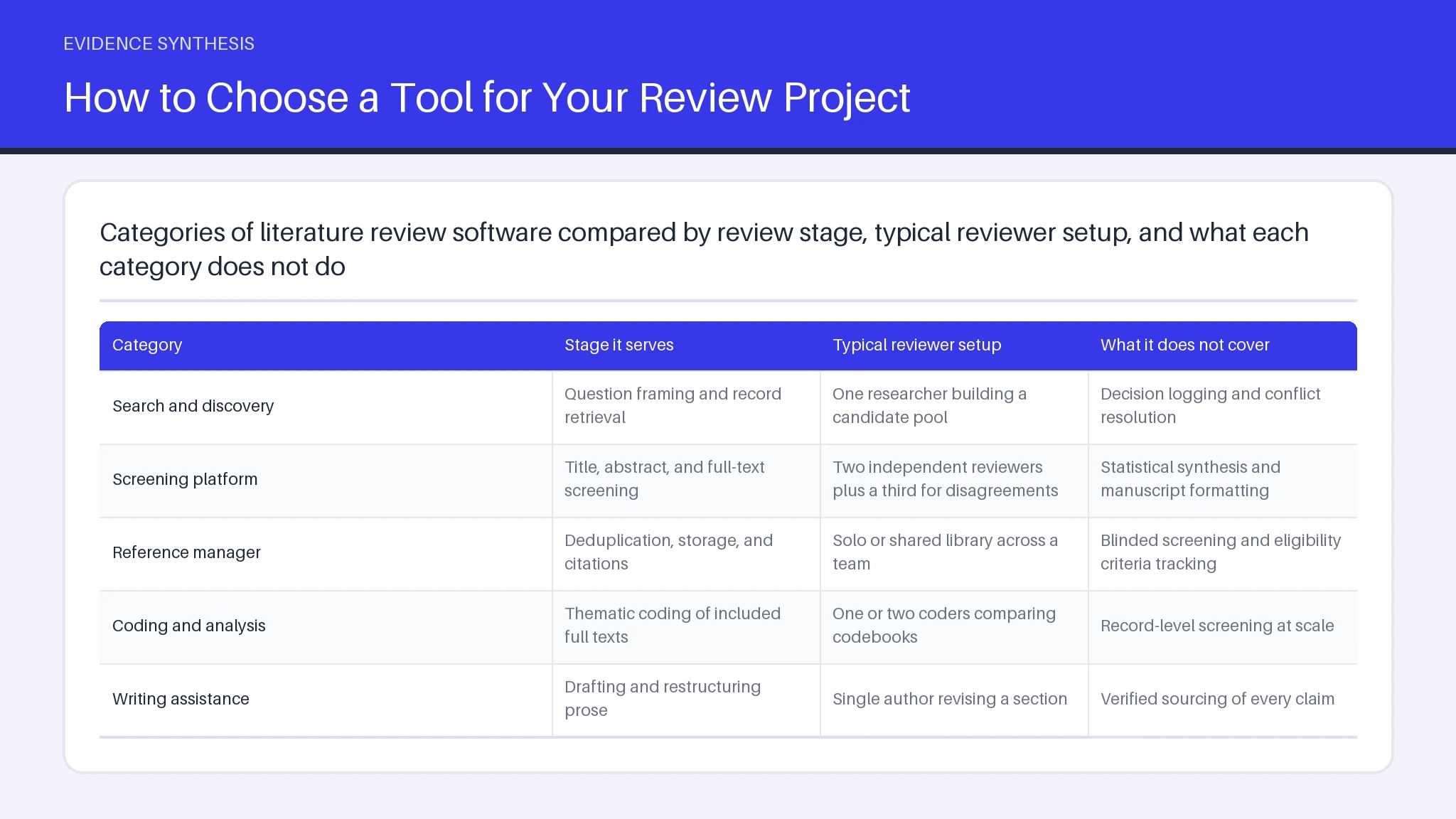
Literature review software splits cleanly into five functional categories, and comparing them by category rather than by brand makes the trade-offs visible. Search and discovery tools surface candidate records and related work. Screening platforms manage title, abstract, and full-text decisions for one or more reviewers. Reference managers store the records and format citations in your manuscript. Qualitative coding software supports thematic analysis of included texts. Writing and summarizing assistants draft prose from material you have already selected.
| Category | Stage it serves | Typical reviewer setup | What it does not cover |
|---|---|---|---|
| Search and discovery | Question framing and record retrieval | One researcher building a candidate pool | Decision logging and conflict resolution |
| Screening platform | Title, abstract, and full-text screening | Two independent reviewers plus a third for disagreements | Statistical synthesis and manuscript formatting |
| Reference manager | Deduplication, storage, and citations | Solo or shared library across a team | Blinded screening and eligibility criteria tracking |
| Coding and analysis | Thematic coding of included full texts | One or two coders comparing codebooks | Record-level screening at scale |
| Writing assistance | Drafting and restructuring prose | Single author revising a section | Verified sourcing of every claim |
Three decision factors cut across every category. The first is whether the tool exports a complete record of counts that can populate a PRISMA flow diagram, which matters for any protocol-driven review process. The second is the integration path between tools, since a broken export means retyping. The third is whether methodological guidance from bodies such as Cochrane expects dual independent assessment for your review type, because that single requirement rules out most solo-friendly options. Our side-by-side breakdown of systematic review platform features covers the paid end of this market in more detail.
How Tools Support Risk of Bias Assessment
Risk of bias assessment is supported by software in three practical ways: structured domain forms, independent duplicate entry, and exportable summary figures. A purpose-built platform presents each included study with the assessment domains as separate fields, so two reviewers rate the same study blind to each other and the tool flags only the domains where they differ. That narrows discussion to genuine disagreement instead of a full re-read.
Spreadsheets can hold the same information, but they lose the audit trail. When a reviewer changes a judgment three weeks later, you want a timestamp and a reason, not an overwritten cell. This is also where general-purpose literature review software falls short: a reference manager stores the paper and its citations, but it has no concept of an eligibility judgment or a bias domain. Keep the reference library for retrieval and handle appraisal in a tool designed for it.
Two details are worth checking before you commit. First, confirm that the tool lets you define custom criteria, because the standard domains for randomized trials do not fit observational or qualitative studies. Second, check the figure export. Traffic-light summaries are expected in many journals, and regenerating one by hand after a late amendment is tedious. The counts that feed your PRISMA flow should come from the same system, so screening totals and appraisal totals agree. Judging whether results can be trusted in the first place is covered in our walkthrough of critical appraisal, which authors should read alongside whichever tool their team uses.
What a Systematic Review Really Costs to Run
The real cost of a systematic review is measured in reviewer hours, not license fees. Published method guidance and institutional library estimates consistently put a full systematic review at roughly a year of elapsed time for a small team, and the bulk of that time sits in two places: building and rerunning the search, and screening the results twice. Software licenses are usually the smallest line in the budget.
Build your estimate from the work itself. A systematic search across several databases typically returns a few thousand records after deduplication. At a realistic pace for title and abstract work, and with two people screening independently, that is tens of hours per reviewer before a single full text is read. Full-text retrieval adds interlibrary loan requests and chasing authors for missing data. Data extraction on a systematic review of thirty included studies often takes longer than screening did, because each field needs checking against the source.
Costs you can control include scope and method. A narrower question reduces the systematic screening load more than any tool will. Choosing a less resource-intensive review format is a legitimate option when time is short, and our overview of rapid review methods explains the trade-offs you accept in exchange. Where a license does pay for itself is in avoided rework: literature review software that keeps a clean audit trail saves you from reconstructing a systematic record six months later when a reviewer asks how many records were excluded and why. Methodological expectations for each phase are set out in our systematic review guide.
Review Tools That Fit PhD Students' Workloads
Doctoral candidates need review tools that work for one person with no budget and no co-reviewer, which rules out most of the dual-reviewer machinery. The practical combination is a free reference manager for storage and citations, a free or institutionally licensed screening platform for the decision log, and whatever writing environment you already use. Adding a fifth tool rarely helps.
Start with the reference layer, because every other tool imports from it. Deduplication happens here, and getting it right early prevents counting the same record twice in your flow diagram. Keep one reference library per chapter rather than one for the whole thesis, so the screening counts you report stay traceable to a specific question.
For screening, the feature that matters to a solo candidate is not collaboration but resumability. You will screen in short sessions over weeks, so you need a tool that remembers where you stopped and lets you tag borderline records for a second pass. Many supervisors ask students to double-screen a ten percent sample themselves and report agreement; a screening tool that supports a second blinded pass makes that feasible.
Thematic analysis of your included texts can stay in the reference manager for small sets, though dedicated coding software earns its place once you pass roughly forty papers and need a real codebook for synthesis. Write your protocol before any of this, even an informal one, so your integration choices follow your method. Many institutions license literature review software that researchers and students can use at no personal cost, so ask your librarian before paying. The chapter-level writing sequence for doctoral authors is covered in our thesis writing walkthrough.
How to Choose a Tool for Your Review Project
Choose a review tool by answering four questions in order: how formal is the method, how many people will make decisions, how many records do you expect, and what must you be able to prove afterward. Those answers eliminate most options before you look at a single feature list.
Method formality comes first. If you are following a registered protocol and reporting against PRISMA, you need record-level decision logging and counts that feed a PRISMA flow diagram without manual arithmetic. If you are writing a reading-led thematic review, flexible notes and reliable citation handling matter more than audit trails.
Team size decides the screening architecture. One person can work in a lightweight tool or even a well-disciplined spreadsheet. Two or more reviewers need blinded screening and a conflict queue, because resolving disagreements by email destroys the record of who decided what. Volume sets the third constraint: below a few hundred studies, almost anything works; above a few thousand, you want bulk tagging, keyword highlighting, and active learning to reorder the screening queue by likely relevance.
Free literature review software is a reasonable default for solo work and for pilot searches, and paid platforms are easiest to justify when several authors share the load or when a funder requires a documented process. Whatever you pick, run a small test batch of fifty records through the full path from import to export before committing, and confirm that your data survives the handoff into analysis and evidence synthesis. One underrated check: ask what happens to your project if the license lapses, since some literature review tools lock exports behind an active subscription. Verify that your screening decisions, not just your references, come out in a readable format for later analysis.
Practical Tips for Writing Up Your Review
Write up your review from the records your tools already hold, not from memory. Export the included set, the reasons for exclusion at full text, and the screening counts before you draft a word, because the numbers in your methods section have to match the numbers in your flow diagram exactly. Reconstructing them afterward is how discrepancies get into print.
Draft the methods section while the detail is fresh. Name each database you searched, the date you ran each search, the full strategy, and the deduplication step. State how many people screened and how disagreements were resolved. Reporting guidance from bodies such as Cochrane treats this level of detail as the minimum for a reproducible review, and it is far quicker to record as you go.
Three habits save the most rework. First, keep one citation key per record from the start so Zotero or whichever reference manager you use never produces two entries for the same paper. Second, write your synthesis around themes or outcomes rather than walking through studies one at a time, since a paper-by-paper tour reads as a list instead of evidence synthesis. Third, check every quoted number against the original article during a dedicated verification pass, not during drafting.
Free literature review software is perfectly adequate for the writing stage, and if an AI assistant helps with structure, treat its output as a draft to verify line by line. Our guidance on synthesizing sources into themes goes deeper on the analysis and argument that turn screening output into prose.
Matching Tools to Each Stage of the Review Workflow
The most reliable way to compare AI tools for literature researching is to map each one to a single workflow stage and judge it only on that stage. No current tool does the whole review, and the useful comparison is between what each type of tool verifies and what it merely suggests. Here are eight tool types by review stage.
- Question framing. Natural language research assistants turn a plain question into candidate concepts and synonyms. Good for scoping, not a substitute for a structured strategy.
- Citation network mapping. Seed-paper tools grow a reading list from forward and backward citations. Excellent for finding work your keywords missed; they will not give you a reproducible search.
- Database search. Controlled vocabulary search in a bibliographic database remains the backbone of formal research, and our PubMed query guide covers the mechanics.
- Deduplication and storage. Reference managers such as Zotero consolidate records and hold the PDFs the rest of your research depends on.
- Screening. Active learning reorders the queue so likely includes surface first. It changes the order of work, not the inclusion rules, and conflicts between reviewers still need human resolution.
- Claim checking. Citation context tools show whether later studies supported or disputed a finding, which is useful when a single result is carrying a lot of weight in your argument.
- Coding and extraction. AI tools can pre-fill extraction fields; every field still needs a human check against the source text.
- Drafting. Summarizing assistants restructure material you supply. AI tools that generate reference lists without a verifiable source record are the main cause of fabricated citations.
Two trade-offs rarely get stated. AI tools that rank records by predicted relevance can leave a long tail unscreened if you stop early, so agree on a stopping rule in advance. And tools trained on open-access text under-represent paywalled research, which skews discovery toward whatever is free to crawl.
Core Capabilities of Our Review Assistant
Systematicly groups its capabilities around the stages where review teams lose the most time: organizing a search, running structured screening, and keeping an inspectable record of decisions. The platform is built for people following a documented protocol, and the headline features map onto that sequence rather than onto a generic writing workflow.
Record handling comes first. Projects accept bulk imports from the usual bibliographic formats, so records exported from a database or from a reference management library such as Zotero arrive with their metadata intact and duplicates flagged for review. From there you define your eligibility criteria once and apply them consistently.
Screening supports independent passes at title, abstract, and full-text level, with disagreements queued separately so a third reviewer can resolve them without re-reading the whole set. Decisions carry a reason code, which is what turns a screening log into something a reader can audit. Counts accumulate as you work, so the totals you report later come from the system rather than a manual tally.
For analysis, extracted fields can be organized per study and exported for further analysis elsewhere, and teams can explore their included set by tag, outcome, or study design before writing up findings. Methodological standards from organizations such as Cochrane define what a defensible review looks like; software supports that work rather than replacing the judgment it requires. Features change, so check current capability on the product pages before planning a project around a specific function.
Feature Coverage by Tool Category
Feature coverage varies more by category than by price, and the gaps follow a predictable pattern. Reference tools cover import, deduplication, storage, and citation formatting, and stop short of eligibility decisions. Screening platforms cover decisions, conflicts, and counts, and stop short of statistical analysis. Coding software covers thematic depth across a modest number of full texts, and is impractical for sorting several thousand records.
The practical implication is that no single purchase closes every gap, and the questions worth asking are about the seams. Can records leave the reference layer in a format the screening tool accepts without losing the abstract? Does the screening export include exclusion reasons as a field, or only as free text? Can extracted data reach a statistics package in tabular form, or does someone retype it? Each broken seam costs hours that no feature list advertises.
Coverage also depends on study type. Tools built around clinical trials assume outcome data that qualitative studies do not have, and researchers working outside health research often need to build custom extraction forms rather than accept the defaults. If your protocol involves mixed study designs, test the extraction form against your hardest case before the main round begins.
One more gap is worth naming: almost no tool helps you write the narrative that connects your findings. That remains human work, informed by the evidence your database searches produced and by the analysis you did on the included set.
Frequently asked questions
Can ChatGPT write my literature review?
ChatGPT and similar assistants cannot write a defensible literature review for you, and treating their output as a finished section is the most common way students get into trouble. A general language model does not run a reproducible search, does not apply your inclusion criteria to a record set, and cannot certify that a cited paper says what it claims. It is genuinely useful for restructuring an argument you have already built, tightening prose, and suggesting synonyms for a search strategy. Everything it produces needs checking against sources you have read.
Which AI tool is best for literature reviews?
The best AI tool for a literature review is the one matched to the stage you are stuck on. For finding adjacent work, citation network tools built on seed papers outperform keyword searching. For sorting thousands of records, active learning screening tools give the largest time saving. For checking whether a claim held up, citation context tools are the right choice. Teams that try to run an entire review inside one assistant usually end up redoing the screening.
Which tool is best for literature review?
For most review projects, a reference manager paired with a dedicated screening platform is the strongest combination. The reference manager handles import, deduplication, and citation formatting; the screening platform records who decided what and why. If your review is informal and reading-led, the reference manager alone may be enough.
What is the best free literature review AI?
The best free options are open-source reference managers and the no-cost tiers of screening platforms, which together cover a solo review end to end. Free tiers usually limit the number of concurrent projects or collaborators rather than the core functions, so a single-author thesis review rarely hits the ceiling. Check whether your institution already licenses a paid tool before assuming you need the free route.
Which literature review AI is best for PhD researchers?
PhD researchers are best served by tools that work without a co-reviewer and export cleanly into a thesis document. That means a reference manager with a solid word processor plugin, a screening tool that supports resumable sessions and a second blinded pass on a sample, and coding software only if your included set is large enough to need a formal codebook.
What is the best Literature Review AI Tool in 2026?
The strongest literature review tool in 2026 will still be a combination rather than a single product, because search, decision logging, appraisal, and writing remain separate problems with separate data models. Judge any new entrant on whether it exports a complete, inspectable decision record. A tool that cannot show how a record moved from search result to included study is not ready for formal review work, however capable its summarizing looks.
How do I verify literature review AI citations?
Verify AI-generated citations by locating each one in a bibliographic database and confirming four things: the authors, the year, the journal, and the specific claim you attributed to it. Check the DOI resolves to the paper named. Fabricated references often look plausible because they combine real author names with a title that was never published, so a quick title search is the fastest test. Never cite a paper you have not opened.