You can get most research papers in PDF legally and for free. Check open access sources first, then your library, then the author. Open access journals, subject repositories such as arXiv and PubMed Central, and aggregators such as CORE together hold millions of full texts. A paper's DOI usually leads you to whichever copy is available. If no free copy exists, a library request or an email to the corresponding author covers most of what is left.
This guide is for students, clinicians, independent researchers, and review teams who need full texts regularly, not once in a while. By the end you will have a repeatable route from a citation to a PDF. You will also know which version of a paper you are holding, how to keep a growing library organized, and how to read faster without missing the findings that matter.
Getting the file is only half the job. A preprint, an author's accepted manuscript, and the final published article can differ in wording, figures, and sometimes results. A paper can also be corrected or retracted after you save it. Most source lists skip these details, but they decide whether the PDF on your screen is safe to quote.
What you need before you start:
- The citation details. A DOI is ideal. If you don't have one, note the title, first author, year, and journal.
- Library access, if you have it. That means your institutional login, off-campus proxy, or VPN, plus the library's interlibrary loan form.
- A place to store files. A reference manager or a simple folder structure works, as long as you follow a naming convention from day one.
- A clear purpose. A quick fact check may be fine with a preprint. A formal appraisal for a review needs the version of record.
If you are retrieving full texts for an evidence synthesis, retrieval is a formal, documented stage of the method. Our systematic review guide explains where it fits. The sections below cover access types, sources, lookup tools, and reading strategies, so finding research papers in PDF becomes a routine step rather than a hunt.
Key takeaways
- Most free, legal full texts come from open access journals, institutional and subject repositories, preprint servers, and your library's subscriptions.
- A DOI is the fastest starting point. It takes you to the publisher's page, and free lookup tools can use it to check repositories for a legal copy.
- The PDF you find may be a preprint, an accepted manuscript, or the published version. Cite and quote from the published version (the version of record) whenever you can.
- For a paywalled paper, interlibrary loan or a short email to the corresponding author is legal and often quick.
- Asking AI questions about a PDF speeds up triage. You still need to check every number, quote, and conclusion against the original page.
Open Access Versus Paywalled Papers: How Access Type Affects Getting the PDF
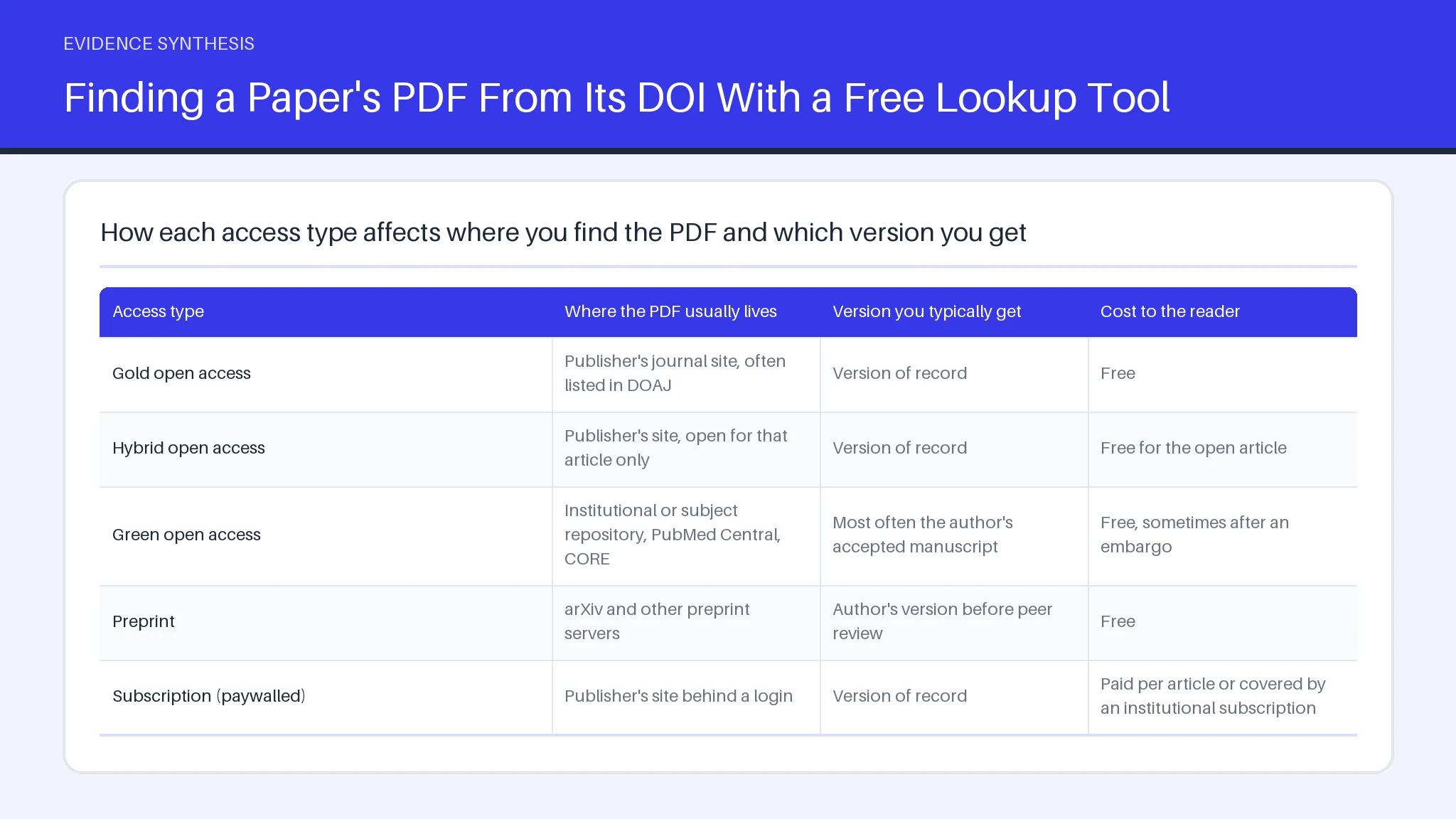
A paper's access type decides where its PDF lives, which version you can download, and whether you have to pay. Gold open access articles are free on the publisher's website. Green open access copies sit in repositories, sometimes after an embargo. Preprints are posted before peer review. Subscription articles need a library license or a per-article payment. If you know the access type before you search, you know whether to look for research papers in PDF on the publisher's site, in a repository, or through your library.
| Access type | Where the PDF usually lives | Version you typically get | Cost to the reader | What to check |
|---|---|---|---|---|
| Gold open access | Publisher's journal site, often listed in DOAJ | Version of record | Free | License terms, often Creative Commons, and whether the journal is indexed |
| Hybrid open access | Publisher's site, open for that article only | Version of record | Free for the open article | The open access label on the article page, since other articles in the same issue may be paywalled |
| Green open access | Institutional or subject repository, PubMed Central, CORE | Most often the author's accepted manuscript | Free, sometimes after an embargo | Page numbers and final edits that may differ from the published article |
| Preprint | arXiv and other preprint servers | Author's version before peer review | Free | Whether a peer-reviewed version has since been published |
| Subscription (paywalled) | Publisher's site behind a login | Version of record | Paid per article or covered by an institutional subscription | Library access, interlibrary loan, or a copy from the author |
The license matters as much as the price. A Creative Commons article can usually be shared with your whole team. A subscription PDF is normally licensed for personal or institutional use only, so it should not be posted to a public folder. A repository copy can also be the only free option for a paywalled article, which makes repositories worth checking before you pay.
Working Efficiently With a Growing Library of Downloaded Paper PDFs
A paper library stays useful only if you can trace every file back to its citation in seconds. Once you have more than a few dozen files, names like "download (3).pdf" make that impossible. A few habits prevent it:
- Name files consistently. FirstAuthor_Year_ShortTitle.pdf sorts well and makes duplicates easy to spot.
- Store the DOI with every file. Remove duplicates by DOI, not by title. Titles often change slightly between the preprint and the journal article.
- Record the version and the source. Note whether a file is a preprint, an accepted manuscript, or the version of record, and where it came from.
- Keep annotations tied to the record. If you replace a preprint with the published version, notes stored in the reference entry carry over. Notes stored in the old file do not.
- Recheck before you cite. A saved PDF never updates itself. Before you rely on it, check the DOI landing page for corrections or a retraction notice.
Tips and common mistakes. The mistakes we see most often are saving the same paper from two sources, quoting page numbers from a preprint, and sharing subscription files in open team drives. Teams that collect research papers in PDF for an evidence synthesis should also log every failed retrieval. Keeping a running count of the reports you tried to retrieve and the ones you could not obtain makes the retrieval stage much easier to report later, and our PRISMA flow diagram guide shows where those numbers go.
How to Read Research Papers Faster Without Missing Key Findings
Reading research papers faster mostly means reading their parts in the right order. You don't need to read faster. Most empirical papers follow a predictable structure, so you can choose which sections deserve close attention. Our research paper structure guide explains that structure. A practical sequence:
- Abstract. Note the question, design, sample, and headline result. Keep in mind that abstracts sometimes state findings more strongly than the results support.
- Figures and tables. The main data usually sit here, often more precisely than in the text.
- First and last paragraphs of the discussion. Authors usually summarize the main finding first and the limitations near the end.
- Methods, when the result matters. Check the design, the comparison group, the follow-up period, and how the outcomes were measured.
- Supplementary files. Protocols, extra outcomes, and full tables are often separate downloads from the main PDF.
When you are triaging dozens of research papers in PDF, write down your question before you open the first file. Then use the PDF search function for terms like "primary outcome", "limitation", "randomized", or your population of interest, which takes you straight to the relevant passages. Skimming tells you whether a paper is relevant. It does not tell you whether the result can be trusted. That needs a structured look at the methods, covered in our guide to critical appraisal.
Legal Ways to Access Research Papers in PDF Online
There are six main legal ways to get a full text: open access copies, library subscriptions, interlibrary loan, the authors themselves, public access repositories, and walk-in library access. Try them roughly in that order. The first two are instant and the rest take a little longer.
- Open access copies. Gold and hybrid articles on publisher sites, green copies in repositories, and preprints are all free and legal to download.
- Library subscriptions. University, hospital, and government libraries license large journal collections. Off-campus proxies and the library's link resolver let you use those licenses from home.
- Interlibrary loan and document delivery. If your library doesn't subscribe, it can usually get a copy from another library. Policies and fees vary by institution.
- The authors. A short email to the corresponding author asking for a copy for personal research use is normal practice. Many publishers allow authors to share their accepted manuscript, and many authors also post copies on their institutional profile pages.
- Public access repositories. Research funded by some government agencies must be made publicly available. PubMed Central holds many papers from NIH-funded research.
- Walk-in access. Some academic and public libraries let visitors use their subscribed databases on site.
Shadow library sites that host copyrighted papers without permission are not a legal route. They infringe copyright, and they can expose your device to malware or your institution's network to security risks. A paper that seems impossible to get is usually one library request away.
Finding a Paper's PDF From Its DOI With a Free Lookup Tool
A DOI is a permanent identifier that turns a search into a lookup. You will find it in the citation, the database record, or the reference list of another paper, and it always begins with "10." followed by a prefix and a suffix. These steps cover most cases:
- Resolve the DOI. Type https://doi.org/ followed by the DOI into your browser. The resolver sends you to the publisher's landing page. Look for an open access label or a PDF button there.
- Run a free open access lookup. Several nonprofit services and browser extensions take a DOI and check repositories and publisher sites for a legal free copy. If they find one, they link to it.
- Search by DOI in open repositories. CORE, Semantic Scholar, and PubMed Central all accept DOIs in their search boxes and show whether a full text is available.
- Use your library's link resolver. If you search through your library, the "find it" or "get full text" link checks the DOI against your subscriptions.
Before you rely on a lookup result, check what the tool actually returned. They only find copies they have indexed, so "no result" does not prove that no free version exists. An author's personal page or a small repository may be missing from their index. They also often return the accepted manuscript rather than the version of record. Check the first page or the repository record to see which one you have before you quote page numbers or exact wording.
Where to Find Research Papers in PDF: A Complete Source Guide
The best source for a free full text depends on your field and on whether you need the peer-reviewed version or will accept a preprint. Each of these sources has its own role:
- Directory of Open Access Journals (DOAJ). An index of peer-reviewed open access journals. Use it when you want versions of record that are free to read and usually free to share.
- PubMed Central. The U.S. National Library of Medicine's free full-text archive for biomedical and life sciences literature. Searching PubMed itself returns abstracts. PMC holds the full texts. Our guide to building PubMed searches helps you find the right records first.
- arXiv. A preprint server run by Cornell University covering physics, mathematics, computer science, quantitative biology, statistics, and related fields. Papers appear quickly and have not been peer reviewed.
- CORE. An aggregator that collects open access content from repositories and journals worldwide. It is useful for green copies of papers that are paywalled on the publisher's site.
- Semantic Scholar. A free discovery engine from the Allen Institute for AI. Once you find a relevant article, you can follow it to the journal's own site, where the full text is usually free to read or download.
- Institutional repositories. Universities host their researchers' accepted manuscripts and theses, often with direct PDF links.
- Your library's discovery search. This covers both subscribed and open content, so it is the broadest single starting point if you have access.
To find free papers on DOAJ, go to doaj.org and switch the search to articles. Enter your keywords, then narrow the results by subject, language, or year. Each article record links to the full text on the publisher's website, where you download the PDF. DOAJ itself does not host the files.
How to Ask AI Questions About a Paper PDF Instead of Reading It
You can upload a paper's PDF to an AI assistant and ask targeted questions to screen it quickly. The method works best when your questions are narrow and you check every answer against the source. Broad prompts such as "summarize this paper" produce smooth summaries that can drop limitations, subgroups, or negative findings. Questions like these are more reliable:
- What was the primary outcome, and how was it measured?
- How many participants were randomized, and how many were analyzed?
- What limitations do the authors state? Quote them and give the page number.
- Does the conclusion go further than the results in the main table?
Asking for a page number and an exact quote makes checking quick. If the quote isn't on that page, treat the whole answer as unreliable. Text-based PDFs work much better than scanned images, which need optical character recognition first. Assistants also often misread complex tables and figures, and they will miss supplementary files you did not upload.
Check two things before you upload. Read the tool's data retention policy. Then check the publisher's license, because some subscription agreements restrict text and data mining or uploading to third-party services. For what AI can and cannot do across a whole body of literature, see our overview of literature review AI. In a systematic review, AI answers can help with triage. They do not replace documented data extraction by human reviewers.
Using the Directory of Open Access Journals for Free Full-Text Papers
DOAJ is a community-curated index of peer-reviewed open access journals. Journals have to meet published criteria on editorial quality, transparency, and licensing before they are listed. Inclusion is a useful signal that a journal is a genuine open access title, which helps when you come across an unfamiliar publisher.
DOAJ lets you search two ways:
- Journal search is useful when you want to know if a specific journal is open access and how it licenses content. You can filter by subject, language, license type, and whether the journal charges publication fees.
- Article search is useful when you are looking for papers on a topic. Results link out to the full text on each publisher's site.
Look for the DOAJ Seal on journal records. It marks journals that meet a stricter set of best-practice criteria, including long-term preservation and machine-readable licensing.
Treat it as one starting point among several search routes rather than your only stop. It indexes metadata and links to articles rather than hosting PDFs, so a publisher outage or a broken link can block a download that DOAJ still lists. Not every journal in DOAJ supplies article-level records, so an article search can miss papers that a journal search would surface. And a DOAJ listing means a journal meets basic standards. It does not vouch for the quality of any single study, which still needs its own appraisal. If you are collecting open access evidence for a quantitative synthesis, the meta-analysis guide explains what data you will need from each paper.
Frequently asked questions
How to download a research paper for free?
Before you pay for access, look for a legal copy you can get for free. Start on the publisher's page, because some articles are published open access and you can download them at no cost. If the article is behind a paywall, ask your university or hospital library whether its subscriptions cover the journal. You can also contact the author and ask whether they can share a copy for your own research. A search on the exact article title may also find a version the author has shared publicly.
How do I find a PDF of a research paper using its DOI?
Treat the DOI as a pointer to the article rather than the file itself. Copy it carefully from the reference, then use it to reach the publisher's page for the paper and look there for a full text or PDF link. If no download is available to you, check which access routes your organization offers, or write to the authors and ask for a copy. In a systematic review, record the DOI next to each PDF you save so your screening decisions and citations stay matched to the right study.
Can I find PDFs for all academic papers?
Not always. Finding a paper in a search does not mean you can open its full text, and access can differ from one article to the next. Treat each title on your list as something to check, not something you can assume is available. If you cannot open a full text, note that next to the record instead of quietly dropping it. That way, anyone reading your work can see what you looked at and what you could not. Our systematic review guide walks through the wider review process.
How to download a research paper from arXiv?
Go to arXiv, find the paper's record, and download the full text from the options listed there. arXiv's own help pages are the most reliable description of those options, so check them if a link or file format is unclear instead of relying on a secondhand summary. Before you screen the paper, read the details its record gives about the work. Then keep a simple note of where the file came from, so you or a co-reviewer can return to the same copy later.
How to find free research papers online with CORE?
Start with the details you already have, such as the paper's exact title or a few precise keywords, and run a search. Treat each result as a lead, not a final source. When a result links to a full text, open it and check which version you have: a preprint, an accepted manuscript, or the published version of record. Make sure the title, authors, and year match the citation you need. Before you quote figures or methods, confirm they match the final published paper, and record the version in your screening notes.
How to find free papers on semantic scholar?
Start with the paper's exact title or a few precise topic terms, then open the record for the paper you want. Look on that record for any route to a full text that doesn't require a subscription. When none appears, the work may still be freely available elsewhere, so search the same title on the publisher's site, in your university's repository, or on a preprint server. Note which version you're reading before you rely on it. If no open copy turns up, ask your library or contact the corresponding author.
How to find and download research papers on PubMed central?
Begin with a focused search that pairs your topic terms with details you already know, such as an author's name, the journal, or distinctive words from the title. Skim the results and judge relevance before you open anything. When a record matches what you need, use the full text or download link the page provides, then save the file under a consistent name that records the first author, year, and a short title. Before you share or reuse an article, check the copyright or license information for that specific paper instead of assuming it is free to reuse.